Gostockup project · 2025 · live
Our own order tracking page
How the most common support question turned into a page where customers see what’s happening with their order, driven by real warehouse events.
The most common question an online store’s support gets is “Where is my order?”. Ours came in through the site, email, social media and phone, and someone answered each one by hand.
A plain “order received” email explains nothing. Between payment and delivery an order goes through many steps: it’s picked, checked, packed and handed on. And a grocery store has three ways to get an order: nationwide shipping, local delivery and pickup. Each has its own sequence.
I wanted customers to see what’s happening with their order without asking support. And I wanted the status on screen to show only what has actually happened.
Principle
Three things a customer needs
Internal operations are more complex than they look from outside. Customers don’t need every detail, they need answers to three questions.
What’s happening now
One clear status in plain words.
What comes next
The next step is visible ahead of time, no surprises.
Do I need to do anything
For example, come pick up a pickup order.
Statuses and the events behind them
- Confirmed the order came in and is paid
- Picking a packer took the order in the warehouse app
- Ready to ship the order is packed, boxes photographed
- In transit handed to the carrier, tracking number issued
- Delivered or ready for pickup
Each status is triggered by a warehouse event, with no manual updates. Local delivery and pickup have their own last steps, with the same logic.
How it looks
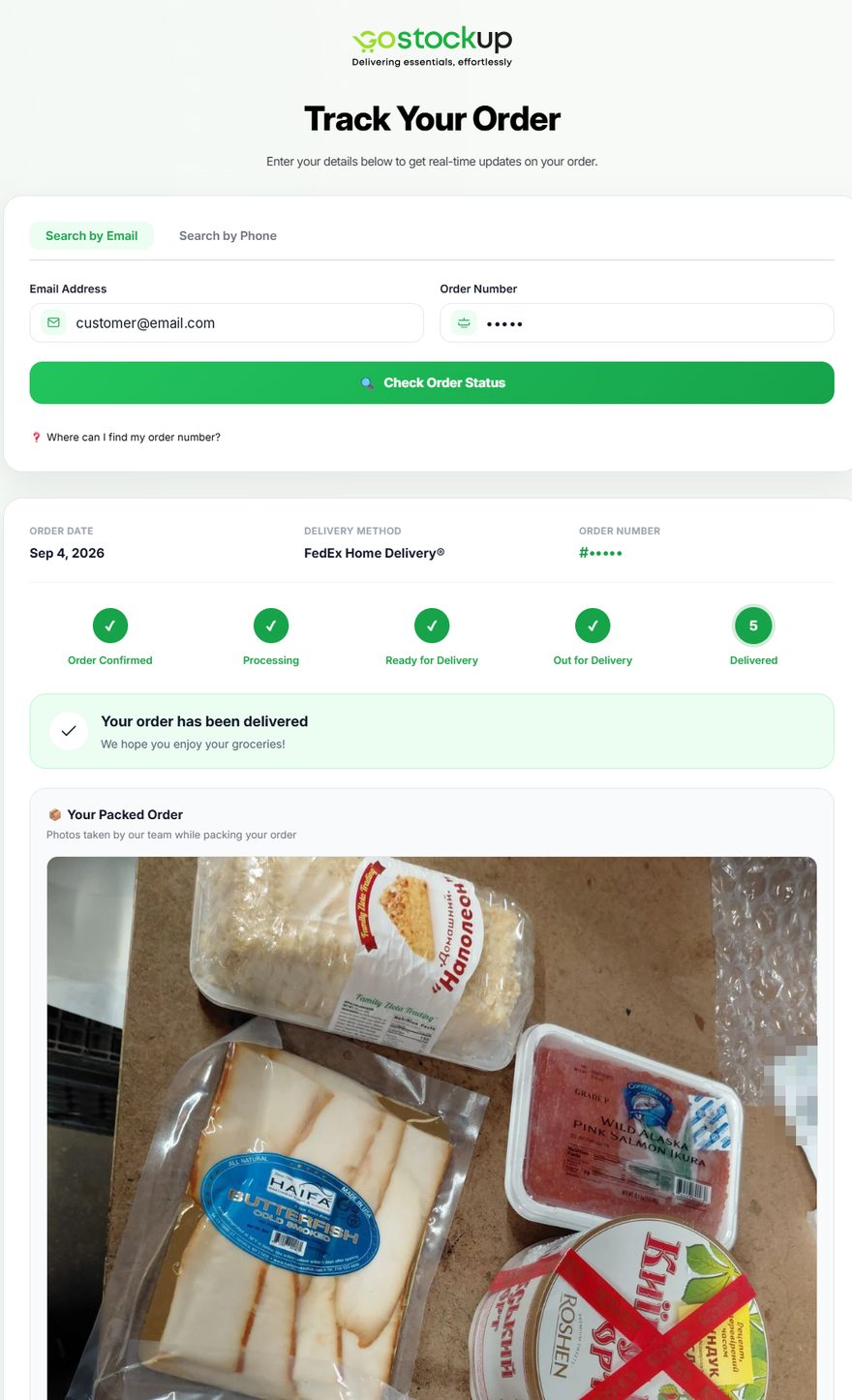
An order number and an email, and it’s all there
Customers enter their order number and the email they ordered with, and see which stage the order is at. Once the order is packed, the packer photographs the boxes, so customers see their package before it arrives.
The page is linked from the customer sections of the site, so tracking became part of a normal purchase.
Who owns what
We answer for our part of the path
Typical tracking starts with a package number. For a grocery store, what matters most is what happens before the carrier.
Before the carrier
- Owner
- Us: receiving, picking, checking, packing.
- Status source
- The warehouse app, as each step actually happens.
After handoff
- Owner
- The carrier, with its own logistics and timelines.
- What we show
- The tracking number and the carrier’s status. We don’t promise what we don’t control.
Result
98% fewer “Where is my order?” questions
This is the support team’s estimate. Before the page launched, these questions came through different channels and nobody counted them in one place. Now every request goes into Zendesk, and the number of these questions keeps going down.
Support now has time for the unusual cases.
How I worked
From support requests to requirements
I started by going through support requests: what people ask, at which stage and with which delivery method. Then I decided which warehouse events actually matter to a customer and what to call them, and aligned that with the platform, the warehouse and support.
I worked through scenarios and status wording with tools, but checked every option against how our warehouse actually works.
The fastest way to reach me is LinkedIn
My full career and notes on the work are there too